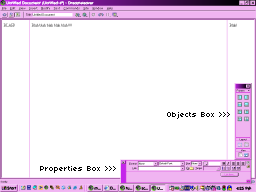
2. Make sure you have the "Properties" window out, If you don't, press Control-F3 (Check the screen shot for what it looks like).
3. Also, make sure the "Objects" box is open, too. Make sure you have that out by pressing Control-F2 (Also in the screen shot).
4. Now, to get the scrollbars. I know I won't be able to explain it well but I will try the best I can. Click inside the frame you want to add scrollbars to.
5. Okay, now you go to Modify (at the top) >> Frameset >> Split Frame Left. Note: You can "split" the frame right, left, up, or down. It doesn't matter.
6. You will see there is an extra frame the appears on the side. Now, all you have to do is click on the edge of the frame, and drag it to the very edge. *make sure it is deleted, to check, you can click on "Edit", and if you see "Undo Delete Frame" at the top then you know you deleted it*
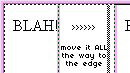
7. Now, look at your Properties. Hopefully you will see something like this:

8. Click on the arrow next to "Default" (or it might say something else) and choose with either "Yes, No, Auto, or Default".
9. Now repeat steps 4-8 if you want to add scrollbars to another frame.